
Workshop syllabus and details

Codex for Business Owners.

A 4-hour live online workshop. Codex is an AI tool from OpenAI — same subscription as ChatGPT, very different way of using it. Once it knows your business, it drafts your emails, reviews your website, plans your ads, and chips away at the admin you've been putting off. We set it up together on your real business. 15 seats. $197 AUD beta pricing — versus $1,600 for the 1:1 version. First 10 buyers lock lifetime access to the full program as it's built.

Reserve a seat — $197 AUD

First 10 buyers lock lifetime program access · Refunds up to 48 hours before.

Live online · join from anywhere4 hours · workbook + replay15 seats · founding cohortFirst or second week of June · day locked when the cohort fills
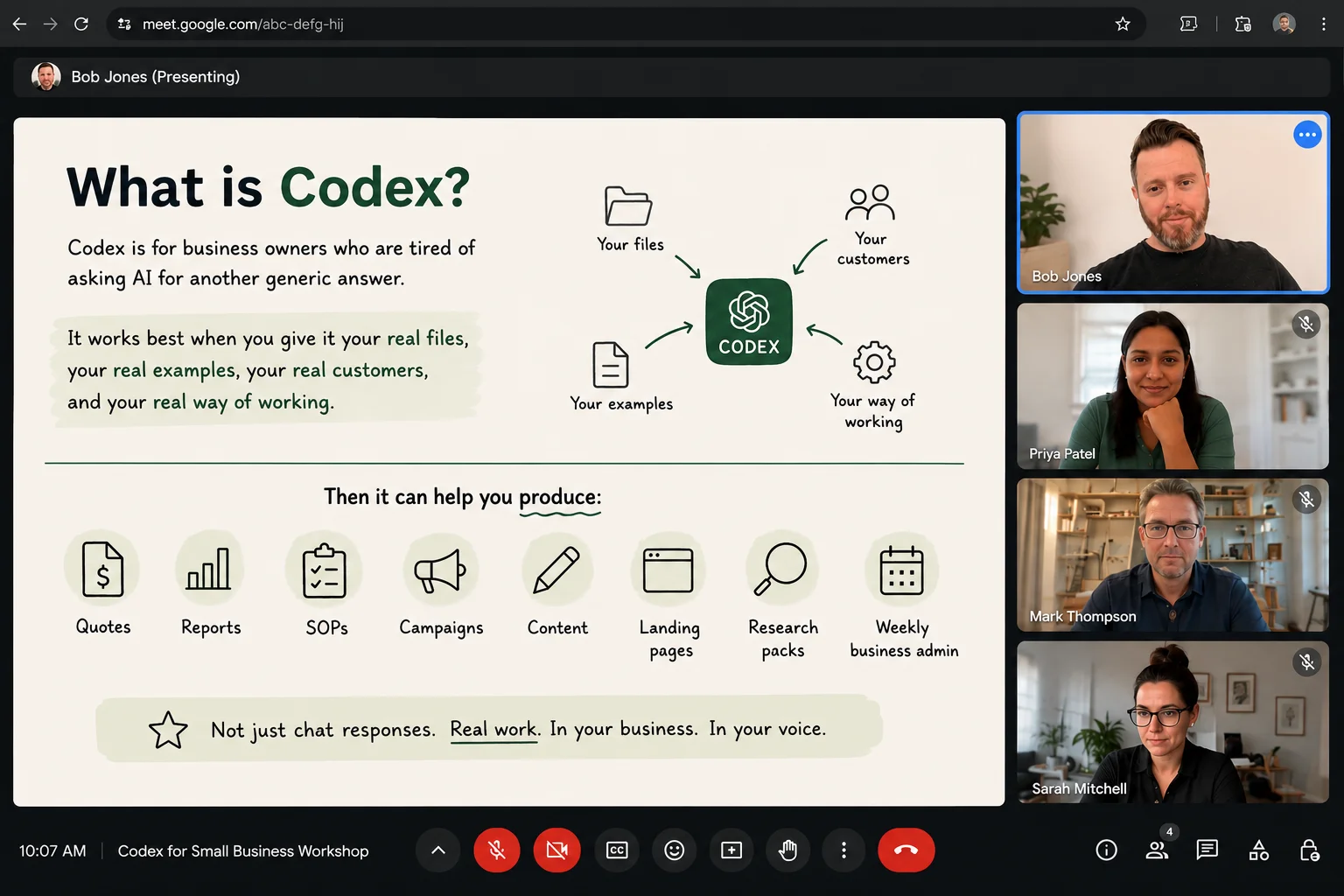
Workshop slide: 'What is Codex?' — explaining that Codex works best when briefed with your real files, customers, examples, and way of working.

What's in the seat

Nine things you walk away with.

Included with your seat

  • Live 4-hour online workshop — seat in the room of fifteen.
  • Your own Codex business setup — briefed on your services, customers, offers, tone of voice, and examples of your work. Not a blank chatbox to copy-paste. A working setup it keeps coming back to.
  • Reusable skill pack — saved instructions like "Review this page like Bob would," "Turn these notes into a client proposal," "Draft an ad campaign from this offer," "Write this in my tone of voice." Codex stops asking the same questions; it just does the next job.
  • A website and copy review workflow — runnable on any page, any landing page, any ad. Headline, offer, trust, CTA, objections, conversion friction — diagnosed with a prioritised fix list.
  • A simple business workspace structure — the folders, the sessions, sidechat, and the way to keep Codex on track instead of producing chat sprawl across forty open threads.
  • The starter template pack — business brief, briefing format, skill examples, and the website review checklist. Copy-paste, fill in your business, ship.
  • Workshop replay and attendee workbook — kept for as long as the program runs. You can revisit anything you missed.
  • A private group for ongoing support — so you don't get stuck the Monday after. Founding cohort gets it for free.
  • First 10 buyers only:lifetime access to the full SkillBuild program as it's built. Every later module, replay, and template added — yours, no further payment.

Is this for you?

Quick fit check, before you book.

Join if

  • You run a business, consultancy, agency, or freelance practice — or you're the team member who quietly runs things.
  • You're comfortable using software but you're not a developer (and don't want to become one).
  • You've got real work — websites, copy, ad campaigns, admin, planning — you'd rather not be doing manually.
  • You'd rather use the tool than learn another framework.
  • You can spare one four-hour morning to set the whole thing up properly.

Skip it if

  • You want a list of clever prompts to copy-paste.
  • You expect AI to do the work with no briefing and no review.
  • You're after a done-for-you miracle tool.
  • You can't bring real business files, customers, or examples to work with.
  • You just want "what is an LLM" theory — start with a YouTube video instead.

The four hours

What we cover, in the order we cover it.

01 Hour one

What Codex actually is — and why most owners are getting nothing out of AI.

Most business owners are using AI like a slightly better search box. Codex isn't that. It can sit inside a project, read your files, follow saved instructions, and keep working across sessions.

Hour one shows you the difference, the install, the basic safety rules, and why the next three hours are worth your morning.

What Codex isHow it differs from ChatGPTThe 'brief, review, approve' loop
02 Hour two

Set Codex up around your actual business.

Your services, your customers, your offers, your tone of voice, your real examples — into a clean folder structure Codex can keep coming back to. We do this with your real business in the room, not a fake template.

By the end of the hour, Codex knows your business better than the last contractor you hired.

Business briefFolder structureTone-of-voice libraryCustomer notes
03 Hour three

Build the reusable skills that actually do the work.

We build the first set of "skills" together — Website Review, Tone-of-Voice Rewrite, Proposal Draft, Ad Campaign Helper. Once a skill is saved, Codex stops asking the same questions and just does the job.

You'll write one skill from scratch for a job you do every week.

/skillsSaved instructionsRe-runnable workflows
04 Hour four

Run real work end-to-end — websites, copy, admin, ads.

Live review of a real page. A draft of an ad campaign. A messy notes-to-action-plan run. The browser, the screenshots, and the mobile shortcuts that let you steer Codex from a phone.

By 1 pm you've used Codex on every category of work that's been sitting on your list.

Website review workflowAd drafting@browserAppshotsMobile steering

What "briefed with your business" looks like

Three jobs. Same tool. The only thing that changes is the brief.

Three illustrations of what happens when Codex has your business in front of it instead of a blank prompt. Same model, same time on task — totally different output. All three workflows are in the workshop.

Specimen 01

Service-page copy.

The opening paragraph of a service site — generic platitudes versus voice-and-specifics.

Blank prompt "Write a homepage paragraph for a local plumber."

"Welcome to Local Plumbing! We are a family-owned business with over 20 years of experience servicing the local community. Our friendly and professional team is dedicated to providing the highest quality service to all of our valued customers."

Briefed with the business Services, jobs, voice, and a real customer in the brief.

"Blocked drain at 4 pm Friday? We'll be there before the weekend. Quoted up front — what we say is what you pay. Family-run, twenty years on the books."

Specimen 02

Messy notes → an action plan.

A brain-dump from a Friday afternoon — turned into something you can actually work on Monday.

Blank prompt "Help me sort out these notes."

"Here are some thoughts to organise: maybe update website, the about page is dated, need new photos, follow up with Sam about the quote, AdWords spending is up, check Tuesday's emails, the Maple St job invoice…"

Briefed with the business Same notes — plus context, plus the "Turn Messy Notes Into A Plan" template.

"This week: Send Sam's quote (revenue at risk). Issue Maple St invoice. Next 3 actions: rewrite About page (1 hr), pull AdWords spend report, book photos. Watch: AdWords up — find which campaign before Friday. Wait: general site refresh until About is done."

Specimen 03

Paid-tool audit.

The bank-statement subscriptions page — vague "should I cancel?" versus a structured decision per tool.

Blank prompt "Should I cancel any of these tools?"

"It depends on what you use each one for. Canva is great for design but you might not need it if you have other tools. Generally, you should keep what you use and cancel what you don't…"

Briefed with the business Tool list with costs and usage — plus the audit prompt with business context.

"Canva ($15): Keep — daily, no overlap. SEO tool ($49): Review — used twice this quarter, Codex covers most of the same jobs. Social scheduler ($29): Cancel candidate — overlaps with the planner already in your CRM. Before cancelling: export your scheduled posts, run one month on the CRM, then decide."

That is the entire premise of the workshop — a re-usable way to brief Codex with what your business actually does, so the output stops sounding like everyone else's.

The four hours, in order

Full syllabus.

Each segment maps to a module in the workshop structure. Times are approximate — we move at the cohort's pace, but everyone leaves at 1 pm with the same setup in place.

01 0:00 – 0:15

Set expectations, show the before/after, explain why Codex is different from casual ChatGPT use.

Opening + promise

  • · How the four hours run
  • · What to have open on your laptop
  • · Why this isn't a coding course
  • · Where human judgment still matters
02 0:15 – 0:40

What Codex is, what it isn't, install, sign-in, basic settings, and the safety rules.

Module 01 — Codex basics and installation

  • · How Codex differs from regular ChatGPT (it can read files, follow saved instructions, work across sessions)
  • · Install, sign-in, the basic settings that matter
  • · Choosing a project folder — what a project means here
  • · The basic safety rules: review before approval, no blind publishing, no secrets in the wrong place
  • · Demo: ChatGPT vs Codex on the same Facebook ad job — one returns generic copy, one returns work that fits the business
03 0:40 – 1:10

Create a clean project structure. Add your business brief, offers, customer notes, tone of voice, and examples.

Module 02 — Business setup and folders

  • · The starter folder structure: business brief, offers, tone of voice, customers, website reviews, ads, proposals, SOPs
  • · Saving useful examples Codex can reference later
  • · What to keep out of the project (secrets, half-finished thoughts, irrelevant noise)
  • · Hands-on: attendees set up their real project folder during the segment
04 1:10 – 1:40

How to start sessions, rename and pin important threads, use sidechat, approve work, and avoid messy chat sprawl.

Module 03 — Sessions and working habits

  • · When to start a new session vs keep the same one
  • · Renaming and pinning so important work doesn't get lost
  • · Sidechat — asking a related question without derailing the main work
  • · How to review before approving
  • · How to stop Codex running off in the wrong direction
  • · Hands-on: name the three sessions you should create for your business (e.g. Website Reviews, Weekly Admin, Campaign Drafting)
05 1:40 – 2:00

Stretch, coffee, questions. Tidy up your folder and note one real job you want Codex to help with.

Break

06 2:00 – 2:40

Build the first reusable skills together — website review, tone-of-voice rewrite, proposal draft, ad campaign helper.

Module 04 — Reusable skills

  • · What /skills are (a saved way of doing a job — not a technical feature)
  • · When to create a skill vs use a one-off prompt
  • · How to write a useful skill that doesn't break
  • · Demo: create a Website Review skill live and run it on a real page
  • · Hands-on: write one reusable skill for a job you do most weeks
07 2:40 – 3:15

Run a live review of a page. Diagnose issues, rewrite copy, create an improvement checklist.

Module 05 — Website and copy review workflow

  • · The review checklist: headline, offer, who it's for, trust, CTA, objections, structure, friction
  • · Section-by-section fixes with prioritised tasks
  • · Demo: run the workflow on a real page and get a prioritised improvement list plus rewritten headline + CTA options
  • · Hands-on: run the checklist against one of your own pages (or a competitor's)
08 3:15 – 3:40

Show Codex what you're looking at instead of describing it. Steer work from your phone.

Module 06 — Browser, computer use, Appshots, mobile

  • · @browser — Codex inspecting a live page
  • · @computer — Codex with screen and app context
  • · Appshots — screenshots as input for QA, fixes, app reviews
  • · Mobile steering: check progress, leave instructions, approve next steps while you're away from the desk
  • · Demo: open a landing page, annotate weak sections, ask Codex to diagnose and rewrite
09 3:40 – 4:00

Turn the four hours into a 7-day plan you'll actually run.

Module 07 — Implementation plan + Q&A

  • · Choose your first three workflows
  • · Clean up the project files before you close the laptop
  • · Plan two more skills to build this week
  • · Schedule one website review and one weekly admin routine
  • · Know when to ask for help — and where the private group lives
  • · Live Q&A

The deal

Refundable up to 48 hours before. Keep the replay either way.

Beta
cohort
policy

How refunds and access work.

If you need to pull out, message me up to 48 hours before the session and the $197 goes back. No form. No "are you sure." After that the seat stays, and you still get the workshop replay, the workbook, and the starter pack. The first-10 lifetime program bonus is locked in at time of purchase.

Codex for Business Owners · Founding cohort

Reserve your seat in cohort 01.

Four hours, live online, fifteen seats. Beta pricing reflects that the larger program is still being built — the first ten buyers lock lifetime access as new modules, replays, templates, and the support group come online.

For context: the 1:1 version of this same setup is $1,600 a day.

$197 AUD · one payment
  • FormatLive online · 4 hours
  • When1st or 2nd week of June
  • SeatsCapped at 15 · founding cohort
  • IncludesWorkbook · skills · replay · group
  • BonusFirst 10 → lifetime program access

Stripe checkout. Refunds up to 48 hours before the session.

Before you book

Questions I get a lot.

Do I need to be technical?

Nope. If you can use Gmail and a website builder, you're fine. No coding, no terminal, no developer stuff.

Will you tell me to cancel every subscription I'm paying for?

No. Some tools are pulling their weight, some aren't. We help you tell the difference — not torch the lot.

Will I walk out with a finished website?

No, and anyone promising that in four hours is having a lend of you. You walk out with a working setup, clear next steps, and the confidence to keep going on your own.

Is this an OpenAI thing?

No. SkillBuild AI is independent. Codex is the tool we're teaching you to use, not a brand we're affiliated with.

P.S. The first ten buyers of cohort 01 lock lifetime access to the full program as it's built — every later module, replay, template, and the private support group, yours without paying again. After the founding cohort the workshop sells on its own, beta pricing closes, and the $197 number goes up. If you're going to do this, do it in the founding ten.

P.P.S. This whole booking website was also built with Codex — copy, layout, Stripe checkout, member portal, the lot. A few hours of briefing and reviewing, no agency, no developer. The site you're reading is the workshop in action.